
.mov
MOV file: what it is and how to open it
A MOV file is a video in Apple’s QuickTime format, the one iPhones record and QuickTime Player saves. Drop one here to play it and see which video and sound codecs it holds.
Drop your MOV file here
Opens on this device. Nothing is uploaded. Any other file works too.
What is a MOV file?
MOV is the file format of QuickTime, the media software Apple introduced in 1991. In 1998 ISO chose QuickTime’s file format as the basis for MPEG-4, so MOV and MP4 files are built the same way and most players open both. Apple still treats them as distinct file types, and its QuickTime Player exports movies only as .mov.
iPhones save their videos as QuickTime movies, in HEVC (H.265) by default since iOS 11. HEVC takes less space than H.264 but needs an extension on Windows. Each Live Photo also keeps the 1.5 seconds before and after the shot as a short QuickTime movie, which can arrive as a separate MOV file when copied to a computer.
iPhone 13 Pro and later Pro models can also record Apple ProRes, a codec made for editing whose files are up to 30 times larger than HEVC. From iPhone 15 Pro they can record it in Log, which keeps more highlight and shadow detail but looks flat and desaturated until color graded. Macs, recent iPads and iPhone 13 or later play ProRes; Windows has no decoder for it.
What is inside
A MOV file is a tree of atoms, Apple’s name for what MP4 calls boxes: each starts with its size and a four-letter type. A current file opens with an ftyp atom carrying the brand qt; files from before 2004 have none and start straight with moov or mdat. The moov atom lists the tracks, their codecs and timing, and mdat holds the frames and sound.
A Live Photo’s movie adds two things: a timed metadata track with one sample marking the instant of the still, and a content identifier that the still also carries, which is how the two files are paired. An 8-byte wide atom usually sits just before mdat, so the file can grow past 4 GB without moving its frames.
A Live Photo├─ IMG_0042.HEICthe still photo (HEIC or JPEG)└─ IMG_0042.MOVabout 3 seconds of motion and sound ├─ ftyp brand qta QuickTime movie ├─ moovthe movie: tracks and timing │ ├─ trak video │ ├─ trak sound │ ├─ trak timed metadataone sample, at the moment of the still │ └─ meta content identifierthe same ID the still carries └─ mdatthe frames and soundHow to open a MOV file
Windows
- Windows Media PlayerBuilt in. Plays MOV with H.264 video. iPhone videos in HEVC need HEVC Video Extensions (US$0.99) from the Microsoft Store.
- VLC media playerFree. Plays MOV with its own decoders, HEVC and ProRes included, so no Store extension is needed.
- Universal File Opener for WindowsOursPlays MOV through Windows codecs, so iPhone HEVC needs Microsoft’s extension too. Trims, joins or saves an H.264 MP4 copy and keeps the original.
Mac
- QuickTime PlayerBuilt in. Plays MOV, ProRes included. File, Export As saves H.264 or HEVC copies, always as .mov files.
iPhone and iPad
- PhotosBuilt in. Plays and edits the videos you record, ProRes included on iPhone 13 and later.
- FilesBuilt in. Tap a .mov file saved from mail or the web to play it.
Android
- VLC for AndroidFree, with no ads. Lists MOV among its formats, with all codecs included and nothing extra to download.
- Universal File OpenerOursPlays MOV with the phone’s own decoders, then saves an MP4 copy, trims, cuts or joins, each as a new file. ProRes usually does not play on phones.
In a browser
- Google DriveUpload the MOV and play it in Drive, which lists MOV with H.264 video and AAC sound and plays up to 1080p.
- Universal File OpenerOursDrop the MOV on this page to play it and see its codecs. A codec your browser cannot decode, such as ProRes, is named. Nothing is uploaded.
Won’t open?
Windows Photos says “You need an extension to use this file”
The video is HEVC, the iPhone’s default. Install HEVC Video Extensions (US$0.99) from the Microsoft Store, or play it in VLC. Importing again by cable may convert it to H.264, unless the iPhone is set to Keep Originals (Settings, Apps, Photos).
Photos copied from an iPhone come with short MOV files
They are the motion and sound of Live Photos. Delete them if you only want the stills. To stop making them, tap the Live Photo button in Camera, and turn on Settings, Camera, Preserve Settings, Live Photo.
A ProRes video will not play, or is huge
Windows includes no ProRes decoder, and the files are large. Use QuickTime Player on a Mac or VLC on a PC, or make a smaller MP4 copy with HandBrake, which reads ProRes.
A Pro iPhone video looks flat and gray
It was recorded in Apple Log, which keeps highlight and shadow detail for color grading. Final Cut Pro reads the log format and applies the matching camera LUT on import. To avoid it, choose ProRes HDR instead of ProRes Log when recording.
Old advice says to install QuickTime for Windows
Skip it. Apple no longer supports QuickTime 7 for Windows, and Windows has played H.264 and AAC by itself since 2009. Use Windows Media Player or VLC, and uninstall QuickTime 7 if it is still on the PC.
Convert a MOV file
- To MP4In Universal File Opener, search Home for MOV to MP4 on Android, or choose Edit, Save as MP4 on Windows; both save a new H.264 copy. On a Mac, HandBrake’s Fast 1080p30 preset writes an H.264 MP4.
- To H.264 MOV on a MacIn QuickTime Player, choose File, Export As, 1080p, set Format to Greater Compatibility and click Save. The copy plays on older devices but is still a .mov file.
- To H.264 for future iPhone videosOn the iPhone, Settings, Camera, Formats, Most Compatible. New videos are recorded in H.264, which Windows plays without an extension. Choose High Efficiency to go back to HEVC.
MOV files in our apps
Play MOV offline on Android or Windows; on Windows, iPhone HEVC video needs Microsoft’s HEVC extension. Both apps save an MP4 copy, trim and join clips for free, each as a new file that leaves the original alone.


All Android tools and limits for MOV files
- MOV to MP4: re-encode a copy to H.264 and AAC with your device codecs, for phones, TVs and sites that refuse MOV. Compress video saves a smaller MP4.
- Trim, cut out a middle part, or join clips in the order you choose. Cuts land on the frame shown at each time, and the result is a new H.264 and AAC MP4.
- Extract the soundtrack as M4A, or save a silent copy with the audio removed.
- Save a paused frame as JPG.
- Playback: speed control from 1/16x to 16x, subtitle and audio-track selection for multi-track files, fullscreen.
- Repeat a section during playback: set A and B more than half a second apart. The loop lasts for the current session.
- Export a silent GIF with Pro. Choose 5, 10 or 15 fps and a longest side of 240, 320 or 480 px. Exports are limited to 256 frames and 32 million pixels in total.
- Trimming, joining, MOV to MP4 and frame saves are free. Cutting out a part, compression, GIFs, audio extraction and muting need Pro.
Limits
- Playback, editing and conversion depend on the codecs your device can decode and encode. Professional codecs such as ProRes usually do not play on phones.
- Video edits cannot keep extra tracks such as subtitles; a video that has them is refused before saving.
- Sound at the cut points can be a few milliseconds off.
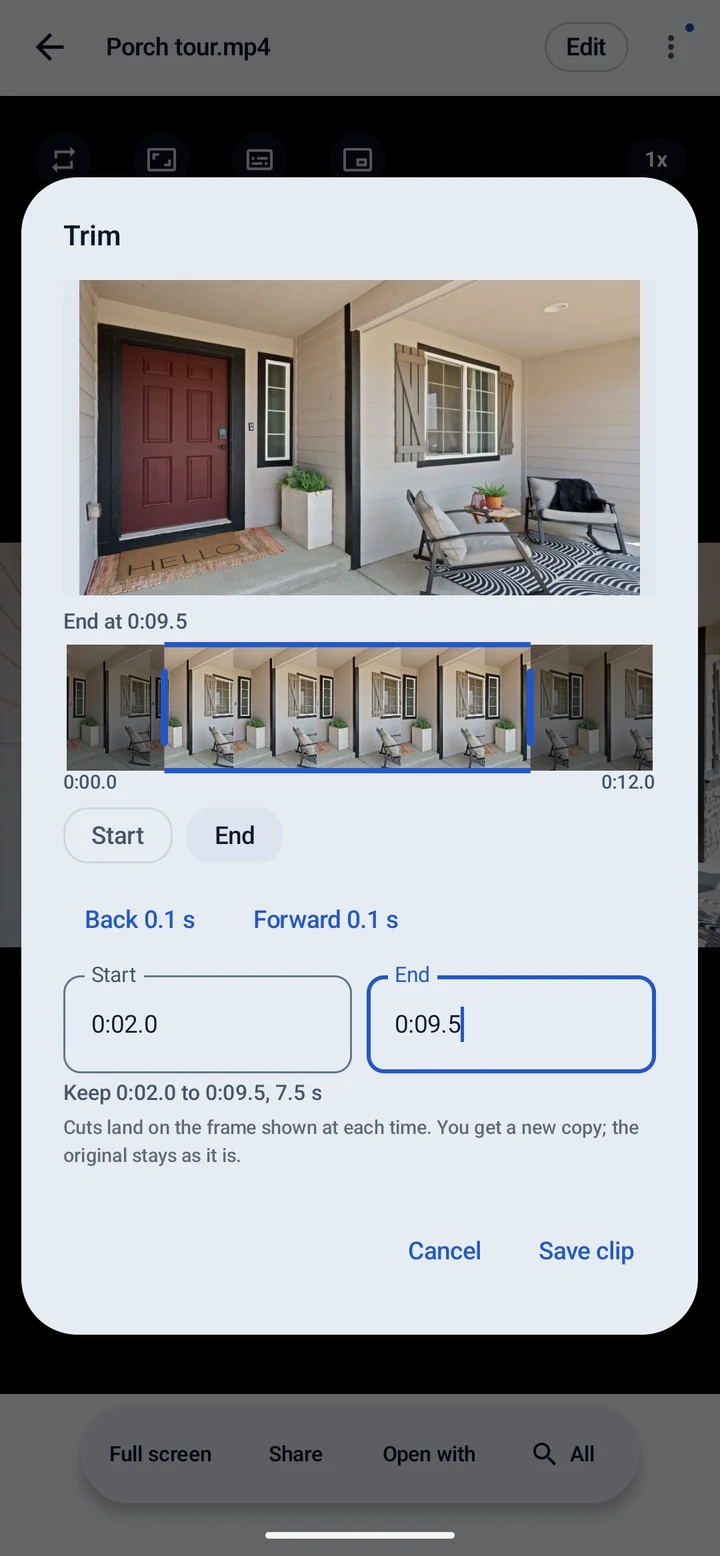
Walkthrough: Edit video and audio on Android