.ttf.otf.ttc.otc
TTF file: what it is and how to open it
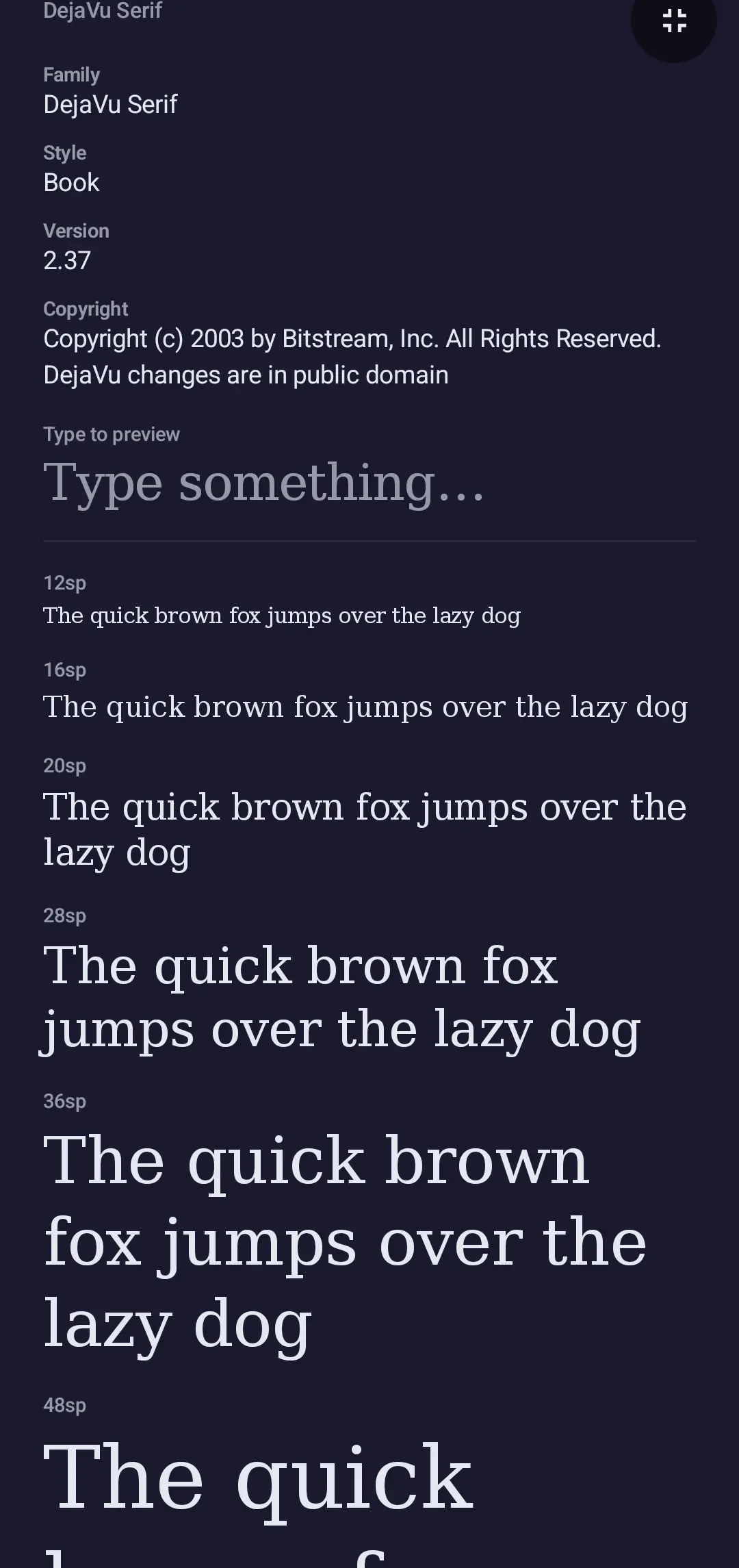
A TTF file is a font: the outline of every letter in a typeface, so text can be drawn in that style at any size. OTF is the same idea in OpenType form. On Android, open either in Universal File Opener to preview your own sample text and every character; in a browser, drop it here. Nothing is installed.
Drop your TTF file here
Opens on this device. Nothing is uploaded. Any other file works too.
What is a TTF file?
A .ttf file holds one font, such as the regular or bold style of a typeface. It stores the outline of each character, which characters it covers and how far apart letters sit. Once installed, every app on the computer can use it, and it stays sharp at any size because the shapes are outlines, not pixels.
Apple created TrueType and shipped it in Macintosh System 7 in 1991; Microsoft added it to Windows 3.1 in 1992. Microsoft and Adobe later extended it as OpenType, which keeps the same structure and can hold TrueType outlines or Adobe’s PostScript-style outlines. Today a .ttf is normally an OpenType font with TrueType outlines, published as the Open Font Format, ISO/IEC 14496-22.
A font is software with a license. Being able to download it does not mean you may share it, embed it in documents or use it on a website. Many fonts carry their license summary inside the file, and a setting tells apps whether the font may be embedded.
What is inside
The file starts with a directory of tables, each named by a four-letter tag. cmap maps characters to glyphs, glyf holds the outlines, hmtx the spacing, and name the family name, version, copyright and license text. Small programs called hints adjust the outlines so text stays crisp at small sizes.
To draw a word, the system looks up each character in cmap, fetches its outline, applies the hints and fills the shape. Optional tables add ligatures, kerning and the shaping many scripts need, and a variable font covers a range of weights in one file.
Inter-Regular.ttf00 01 00 00version: TrueType outlinestable directoryone entry per table: tag, offset, length cmapcharacter to glyph glyf, locathe outlines and their index hhea, hmtxline height and letter widths namefamily, version, copyright, license OS/2metrics and embedding permission GSUB, GPOSligatures and kerning (optional)How to open a TTF file
Windows
- Font previewBuilt in. Double-click the file to see sample text, or right-click and choose Install.
- Settings, Personalization, FontsBuilt in. Lists installed fonts and removes them.
- Universal File Opener for WindowsOursOpens the font to preview it and read its details without installing it.
Mac
- Font BookBuilt in. Double-click to preview, then click Install; Font Book checks the font for errors as it installs.
iPhone and iPad
- A font app from the App StoreApple’s supported route. Installed fonts appear in Settings, General, Fonts.
Android
- Universal File OpenerOursPreviews sample text and font details, including TTC and OTC collections. Android itself cannot install a font file system-wide.
In a browser
- Universal File OpenerOursDrop the font on this page for a specimen sheet: sample text at five sizes, every character set and the font’s details. It is never installed.
Won’t open?
Windows says it is not a valid font
The download may be incomplete or not a font at all. If it came as a .zip, extract it first and install the .ttf inside. Drop the file on this page to see what it really is.
A .woff or .woff2 file will not install
Those are web fonts for websites. Windows and Mac install .ttf and .otf files; get the desktop version from the font’s source.
It installed but does not show up in my app
Close and reopen the app; some apps read the font list only when they start. On a Mac, check in Font Book whether it was installed for you only.
Tapping it on an iPhone does not install it
iOS installs fonts only through an App Store app that contains them or through a profile from your organization.
Word will not embed it in a document
The font’s maker can restrict embedding with a setting inside the file. Check the license, or choose a font that allows embedding.
Convert a TTF file
- To WOFF2, for a websiteThe free fontTools library compresses a .ttf to .woff2. Only do this if the license allows web use.
- To OTFRenaming changes nothing, because both extensions can hold either outline type. A real conversion needs a font editor such as FontForge.
TTF files in our apps
A TTF or OTF file stores a font; open it in UFO on Android to preview sample text and font details. UFO also previews TTC and OTC collections, but does not install system fonts.


All Android tools and limits for TTF files
- Custom sample text rendered live at multiple sizes. Test the exact headline or label you plan to set.
- Font metadata: family, style, version, designer, and copyright fields, tap-to-copy.
- TrueType collections (.ttc/.otc) with multiple faces are supported.
- WOFF web fonts preview too; converting one to TTF or OTF needs Pro. See the WOFF page.
Limits
- UFO previews fonts but does not edit them or install system fonts.
- WOFF 1.0 is supported; WOFF2 is unavailable.