
.bin.bak.tmp
How to open an unknown file: find out what it is
A file with no extension, or a vague one like .bin or .dat, usually says what it is in its first few bytes. On Android, tap Open file in Universal File Opener and pick it; in a browser, drop it here. UFO reads those bytes on your device, names the type from the 580 it recognizes and opens the file when it can. Nothing is uploaded.
Drop your unknown file here
Opens on this device. Nothing is uploaded. Any other file works too.
What makes a file unknown
A file is unknown when its name does not say what it is. Some files have no extension at all, some were renamed by a download or a chat app, and some use generic extensions such as .bin, .dat, .tmp or .bak that many unrelated programs use for their own data.
The extension is only a label. Windows, Android and Mac choose an app from the name, so a PDF saved as download.bin opens in nothing, even though every byte of the PDF is intact. The contents decide what the file really is.
Most common formats begin with a fixed signature that their specification requires, sometimes called magic bytes. Reading the first few bytes therefore identifies most everyday files, whatever their name.
How a file says what it is
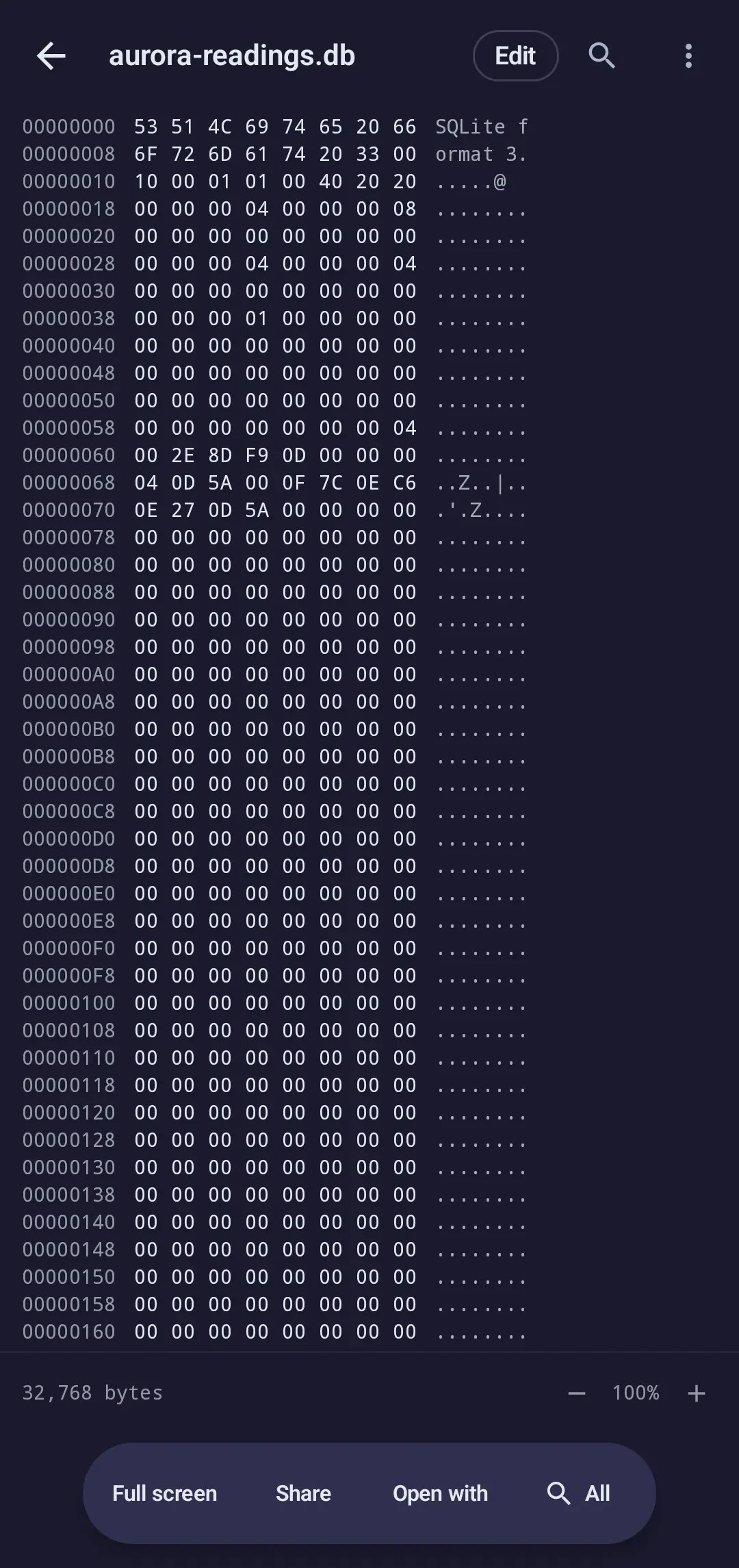
Open any file in a hex viewer and the first bytes usually give it away. A PDF starts with %PDF-, a ZIP archive with PK, a PNG with the bytes 89 50 4E 47. Word, Excel and PowerPoint files since 2007, EPUB books and Android apps are ZIP packages too, so they also start with PK; the files inside the package tell them apart.
Some families share a container. Old Word, Excel and PowerPoint files and Outlook .msg messages all use Microsoft’s Compound File format, which starts with D0 CF 11 E0. MP4 and MOV videos and HEIC photos carry the word ftyp at byte 4, followed by a brand such as isom, qt or heic. Plain text has no signature at all, so it is recognized by its characters instead.
25 50 44 46 2D (%PDF-)PDF50 4B 03 04 (PK)ZIP, DOCX, XLSX, PPTX, EPUB, APK89 50 4E 47 0D 0A 1A 0APNGFF D8 FFJPEG47 49 46 38 (GIF8)GIFD0 CF 11 E0 A1 B1 1A E1DOC, XLS, PPT, Outlook MSG37 7A BC AF 27 1C7Z52 61 72 21 1A 07 (Rar!)RAR1F 8BGZIP (.gz, .tgz)53 51 4C 69 74 65 (SQLite)SQLite database66 74 79 70 (ftyp) at byte 4MP4, MOV, HEIC52 49 46 46 (RIFF)WAV, AVI, WebP4D 5A (MZ)Windows program78 9F 3E 22winmail.dat from OutlookHow to identify and open it
Windows
- Windows PowerShellBuilt in. Format-Hex .\file.bin | Select-Object -First 1 shows the first 16 bytes to compare with the list above.
- Universal File Opener for WindowsOursOpens a renamed or extensionless file as what is inside it, and shows text or raw bytes for the rest.
Mac
- TerminalBuilt in. Type file, a space and the file’s path; it names the type from the contents, for example “PDF document, version 1.7”. Linux has the same command.
Android
- Universal File OpenerOursTap Open file and pick it. UFO opens it as what it really is, or shows its text or raw bytes.
In a browser
- Universal File OpenerOursDrop it on this page to name it from its contents and open it when supported. Nothing is uploaded.
Still won’t open?
It has no extension at all
The contents still identify it. Drop it on this page, or run file on it in Mac Terminal. Once you know the type, add the extension to its name (photo.jpg, report.pdf) so your other apps offer to open it.
It is called winmail.dat
Outlook can wrap a Rich Text email and its attachments in winmail.dat (Microsoft’s TNEF format), which other mail apps cannot unpack. Drop it here or open it in our Android or Windows app: it opens as the email, with every attachment ready to save.
A .bin next to a .cue file, or from a device maker
A .bin with a .cue of the same name is a CD or DVD image; open it with a disc image tool. A .bin from a router, camera or console maker is usually firmware: install it only with that maker’s updater.
A .tmp or .bak file
Apps write these while saving or as backups. Drop it here: a complete copy of a Word file, PDF or photo opens like the original, while a partial one may show only text or bytes.
Only strange characters appear
The file is binary data in a format we do not read. Compare its first bytes with the list above, look at the app or folder it came from, or ask the sender which program made it.
Unknown files in our apps
BIN and DAT files can contain many kinds of data; open one in UFO on Android to check for supported content or inspect text and raw bytes. Inspection does not guarantee a readable document.


All Android tools and limits for unknown files
- Inspect file contents to identify supported renamed or extensionless formats.
- Text view for printable content, with encoding detection and search.
- Inspect offsets, bytes and ASCII side by side. Search for bytes or text; a file signature can help identify its format.
- File info with size, MIME, and SHA-256/SHA-1/MD5 checksums to verify a download against a published hash.
Limits
- Identification may be incomplete. Viewing raw bytes does not make an unsupported format readable or editable.
- Large files use a paged hex view; file and editing limits still apply.
Walkthrough: Edit text, code and data on Android